On a recent call with a roughly 300-person fintech preparing for DORA compliance, the team raised a problem that should make any compliance lead uncomfortable. Their process had changed, but the documented procedure behind it had not. And on paper, everything still looked official.
In many teams, that gap goes unnoticed for months:
- An outdated procedure keeps circulating as though it is still up to date.
- Employees continue working from it.
- Even worse, AI agents retrieve the same document without knowing that the procedure it describes is no longer in use.
- Then auditors compare the documented procedure with the way the company actually works and flag the mismatch.
And it’s the inconsistencies between documented processes and actual implementation create audit findings.
We have heard the same complaint from companies across healthcare, financial services, and other regulated industries facing SOC 2, HIPAA, or DORA requirements.
For many of them, the documents exist. The problem is proving which version was approved, who owned it, and whether it still matches the process the company currently follows.
Document control is the process that keeps those answers connected to each document throughout its lifecycle, from creation and approval through distribution, access control, review, and retirement.
In this guide, we explain how to define that process, create the policy and register behind it, and keep compliance documentation audit-ready for SOC 2, HIPAA, and DORA.
Key takeaways
- Document control gives every important document a clear owner, current version, approval trail, access rules, review schedule, and retirement process.
- Everyday documents can use lighter governance, while regulated records may require immutable versions, fixed revision links, and strict retention.
- Most document-control failures happen during handoffs, especially when a formally approved policy changes but the employee-facing copy does not.
- Review dates catch gradual decay, but operational changes should also trigger reviews when systems, vendors, controls, regulations, or workflows change.
- SOC 2, HIPAA, and DORA all have different requirements, but auditors still need to see which document was current, who approved it, when it applied, and whether the company followed it.
- Slite supports the working side of document control through ownership, verification, permissions, review workflows, and drift detection. Keep records requiring stricter approval and revision controls in a QMS or compliance platform.
What is document control?
Document control is the process a company uses to manage important documents from creation to retirement. It tells you which version of a document is approved, who owns it, who can access it, and what evidence should be preserved when it changes.
Modern document control has roots in ISO 9001:2015, an international standard for quality management systems. Clause 7.5 of the standard covers the identification, review, approval, access, change, retention, and disposal of documented information.
For example, in a technology company, this may include security policies, system procedures, business continuity plans, vendor procedures, clinical processes, and any standard operating procedure whose accuracy affects compliance or a customer commitment.
The greater the risk, the tighter the controls should be.
However, the process becomes more complicated once a document has gone through several revisions. Document version control can show what someone changed, but the company still needs to know which version was approved, when it took effect, and what happened to the copy it replaced.
According to a SaMD vendor in our community, auditors wanted to see the latest approved version of each document. The team had added a control table to the beginning of each page to track approvals and dates, but those tables can eventually go stale, too.
A complete document control process should answer:
- Who was allowed to make the change?
- Who had the authority to approve it?
- When did the new version become effective?
- Where were employees expected to find it?
- What happened to the version it replaced?
Document control vs document management
Document management is the broader practice of storing, organizing, searching, and retrieving documents.
Document control is one part of that wider practice. It establishes which documents are approved for use, who can change or access them, and what happens as they are reviewed, replaced, or retired.
| Document management | Document control |
|---|---|
| Stores and organizes documents | Establishes which copy is approved for use |
| Makes documents easier to search and retrieve | Defines who can access, change, and approve them |
| Maintains a central location for documents | Records reviews, approvals, and effective dates |
| Supports archiving and retention | Defines what happens when a document is replaced or retired |
The document control lifecycle
A controlled document moves through six stages. At each one, someone makes a decision, follows a defined rule, and keeps evidence of what happened.
| Stage | Question to answer | Record to keep |
|---|---|---|
| Create | Who owns the document, and how is it identified? | Owner, author, creation date, and status |
| Approve | Who reviews the document, and who has the authority to approve it? | Review and approval record |
| Distribute | Where does the approved copy live, and who needs to receive it? | Approved location and distribution record |
| Control access | Who can read, edit, share, or administer the document? | Permission record |
| Review | Who checks that the document still matches how the work is done? | Review or verification record |
| Retire | When is the document no longer approved for use, and what must be retained? | Archive and retention record |
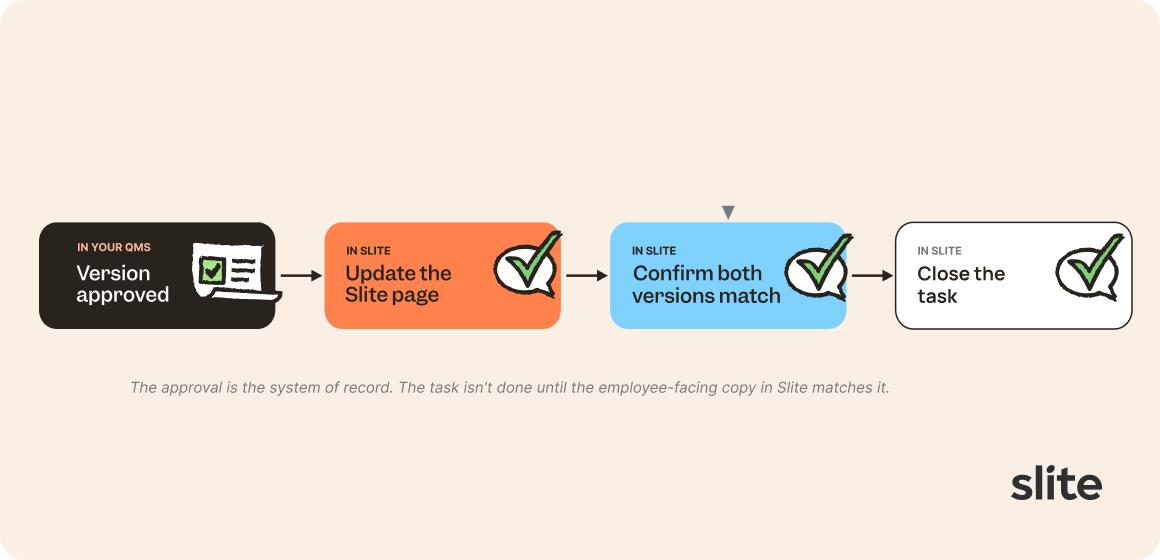
The process should also spell out the handoffs between systems.
If the approval happens in a QMS and the employee-facing copy lives in Slite, for example, someone needs to update the Slite page, confirm that both versions match, and close the task.
What counts as proof of document approval?
Approval from a named security owner may be enough, while another document may require a second reviewer. A timestamped comment can also count when the policy defines it as the approval event and the system preserves the record.
The proof of approval should identify:
- The person who had authority to approve the document
- The exact version they approved
- The date the approval took effect
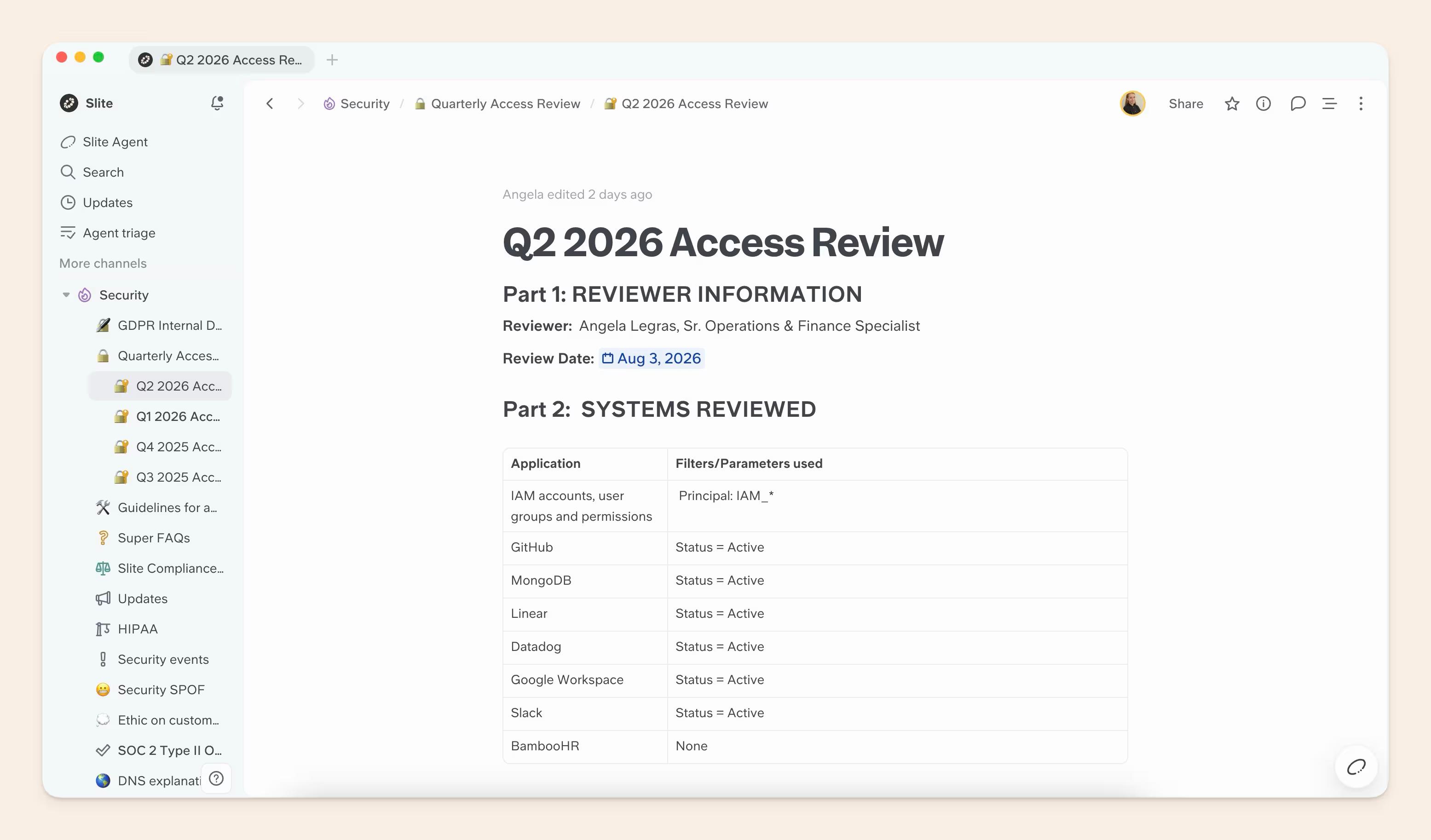
If any of these details is missing, it is unclear what was approved.
Why teams need one approved copy
When several copies are available, employees may use an older version and continue recirculating it without realizing it. Someone may save the policy as a PDF, attach it to a ticket, or keep a copy on a desktop.
One prospect saw this scenario play out in its enablement system. Employees kept sharing downloaded files after newer versions replaced them.
Define where the approved version lives and make that location the single source of truth.
How to control who can access and change documents
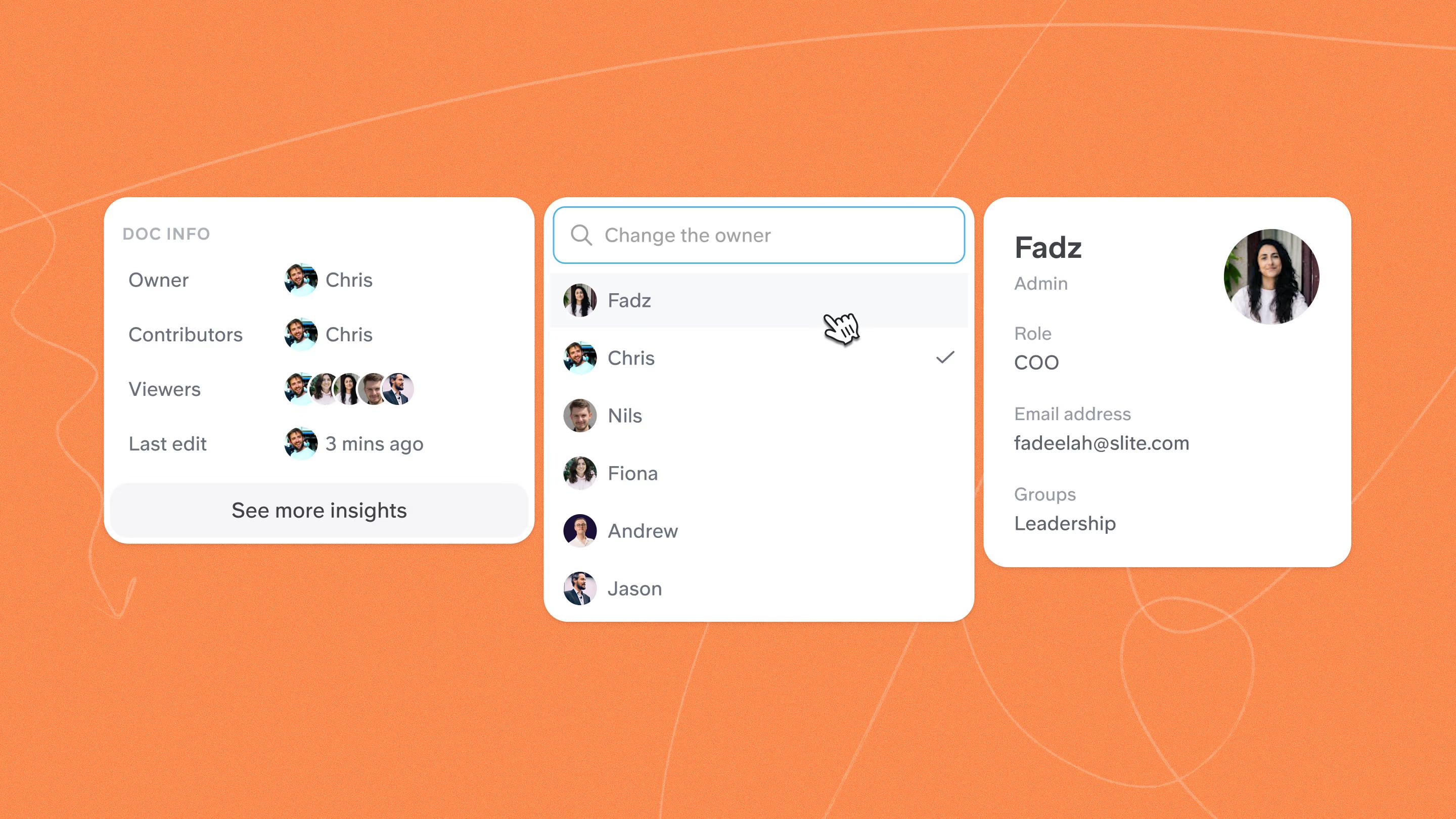
Set permissions based on what each person needs to do:
- Read: Make approved documents available to the employees who need them.
- Edit: Limit changes to the document owner or responsible team.
- Review and approve: Assign these actions to named roles with the right authority.
- Publish: Keep drafts private until review is complete, then move the approved version into the main knowledge base.
- Share and manage permissions: Restrict these actions so sensitive documents do not spread beyond the intended audience.
Apply the same permissions to AI search. Someone who cannot open a restricted document should not be able to retrieve its contents through an assistant.
For example, Slite uses the permissions already set in the knowledge base, so employees can only search or ask questions about documents they are allowed to access.
How to keep documents current for audits
A review schedule alone is not enough. A document may be reviewed once a year and still become outdated a week later if the process changes.
Use two types of review:
- Scheduled review: Check the document on a fixed date, such as every six or twelve months.
- Change-triggered review: Check the document as soon as something it describes changes.
An access control policy may have an annual review date. But if the company changes its identity provider or creates a new privileged role, the change in process should trigger a review of the document.
Slite Agent, for example, checks documents against activity across more than 20 connected tools, including GitHub, Jira, and Slack.
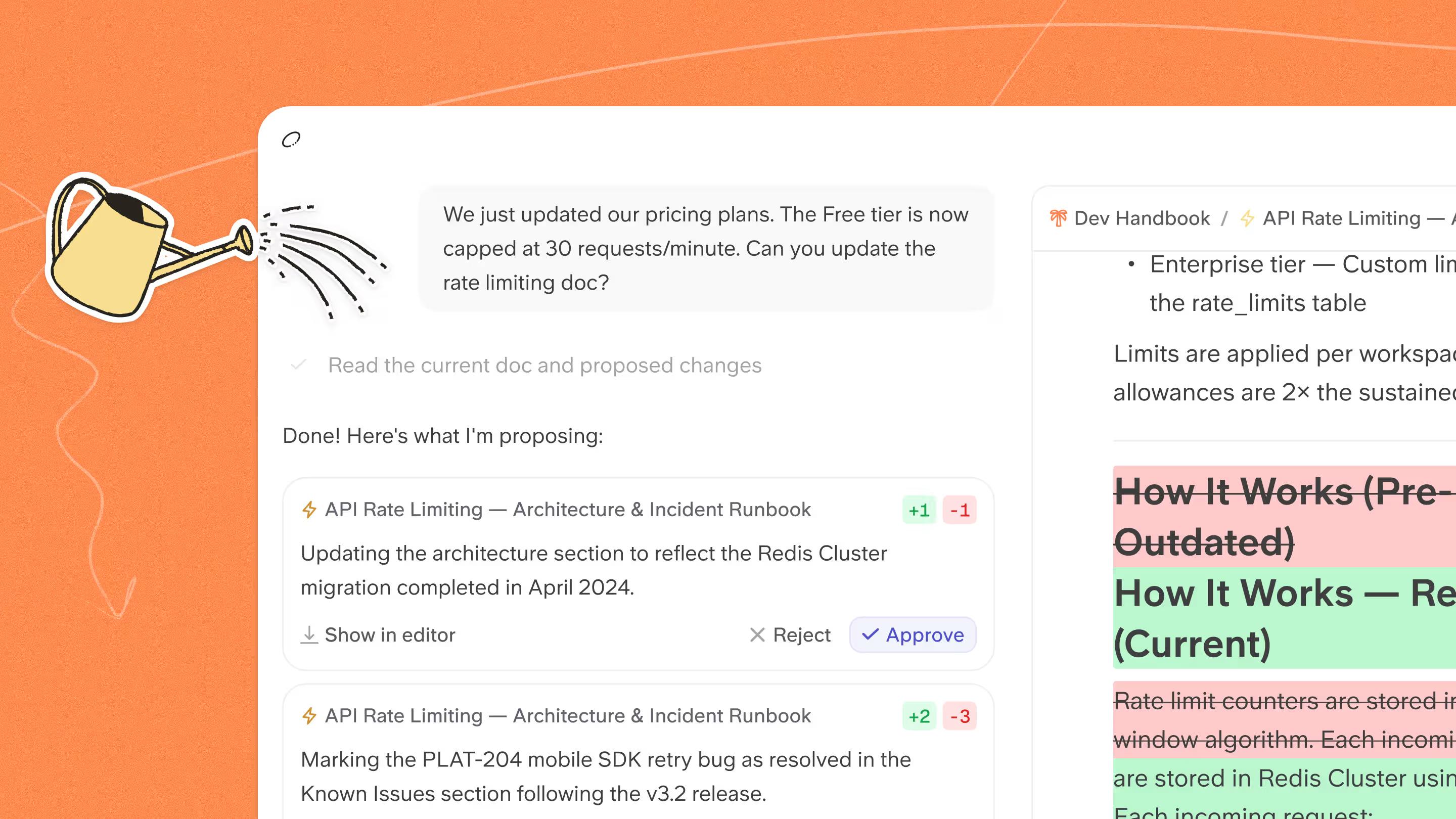
When it spots a change that may have made a document outdated, it flags the affected section and drafts an update for the document owner to review. Nothing is changed automatically.
How to create a document control policy
Create the policy by working through these steps:
- Define the scope. List the documents that need formal control. This may include security policies, incident procedures, business continuity plans, standard operating procedures, and regulated records.
- Set identification rules. State how the title, document ID, version, status, owner, and effective date should be recorded.
- Assign responsibilities. State who can create, review, approve, publish, update, and retire each type of document. Use named roles instead of assigning a step to a vague team.
- Set the approval rules. Define what counts as approval, who has the authority to give it, and when the approved version takes effect.
- Choose the approved location. State where employees should find the current version and how older copies will be removed from use.
- Control access and protection. Define who can read, edit, share, and manage permissions for each type of document. Explain how documents will be protected from unauthorized changes, loss, and accidental deletion.
- Set review rules. Give each document a review period and list the changes that should trigger an earlier review.
- Define change and retirement rules. Explain how updates are recorded, when a revised version becomes current, where replaced versions are kept, and how long they must be retained.
- Cover external documents. Explain how the company tracks standards, regulations, customer requirements, and vendor documents that affect its work.
Then test the policy with one real document. A colleague who was not involved in writing the policy should be able to follow it without asking who approves the document, where to publish it, or what to do when it changes.
Then create a controlled document register
The register keeps the details for each controlled document in one place.
It should identify the owner and show the document's current version and status. It should also record who authored, reviewed, approved, and published it, along with the effective date, approved location, next review date, and retention requirement.
One customer preparing for ISO 9001 said its auditors wanted "a simple table" covering review, approval, and publication. Yours could look like this:
| Field | Access Control Policy | Incident Response Procedure |
|---|---|---|
| Owner | Security Lead | Security Lead |
| Version | 3.0 | 2.1 |
| Status | Approved | Approved |
| Author | Security Lead | Incident Response Lead |
| Reviewer | Compliance Lead | Compliance Lead |
| Approver | CTO | CTO |
| Publisher | Compliance Lead | Compliance Lead |
| Approved location | Security > Policies | Security > Procedures |
| Effective date | 15 April 2026 | 1 June 2026 |
| Next review | 15 April 2027 | 1 December 2026 |
| Retention requirement | Per policy | Per policy |
Keep the register in the same knowledge base as the controlled documents, or link each entry directly to the approved copy. Then assign someone to maintain it. Without an owner, the control table can become another stale document.
How document control keeps compliance documentation audit-ready for SOC 2, HIPAA, and DORA
For SOC 2, auditors examine documentation and records that support the controls being assessed. HIPAA and DORA explicitly require certain policies, procedures, assessments, incident records, and registers.
In each case, the organization needs to show:
- Which document was current
- Who owned and reviewed it
- When it was approved or updated
- Whether it matched the process being followed
- Whether required records were retained
| Framework | What the framework expects | Documentation to keep ready |
|---|---|---|
| SOC 2 *(System and Organization Controls 2)* | Controls are defined, assigned, communicated, operated, monitored, and evidenced | Current policies and procedures, named owners, approval and review records, change history, and operating evidence |
| HIPAA *(Health Insurance Portability and Accountability Act)* | Required policies and procedures are documented, available, updated, and retained | Security policies, risk analyses, access and incident procedures, review history, and records retained for six years |
| DORA *(Digital Operational Resilience Act)* | The ICT risk framework, incidents, and third-party arrangements are documented and kept current | ICT policies, owners, review dates, incident records, change evidence, and a complete Register of Information |
SOC 2 documentation requirements
System and Organization Controls 2 (SOC 2) is an attestation examination performed by a CPA firm using the AICPA Trust Services Criteria. It helps service companies show that they have suitable controls for protecting customer data and running their systems reliably.
It does not require the same documents from every company. The documents depend on the controls included in the audit and may include policies, procedures, review records, approvals, and proof that the controls operated as described.
HIPAA document control requirements
Health Insurance Portability and Accountability Act (HIPAA) is a US law that protects the privacy and security of health information. It applies to covered entities and business associates that handle protected health information.
HIPAA requires covered entities and business associates to maintain documented policies, procedures, and records supporting compliance with applicable HIPAA requirements.
These documents must be available to the people responsible for using them and retained for 6 years from the date they were created or last in effect, whichever is later.
For example, if a policy was created in 2020 but remained in effect until 2024, it must be retained until 2030.
DORA documentation requirements
The Digital Operational Resilience Act (DORA) is an EU regulation designed to strengthen digital operational resilience in the financial sector. It requires financial entities to document how they manage ICT risks, incidents, and third-party providers.
Required records include current ICT policies, incident documentation, review and change records, and the Register of Information for ICT third-party arrangements.
Document control audit checklist
Use this checklist to review the full document control process before an external audit. The review can be led by compliance, quality, security, operations, or an internal auditor.
Review a sample of controlled documents and confirm that:
- Each document falls within the policy scope and appears in the register.
- The title, document ID, owner, version, status, and effective date are clear.
- The defined creation and revision process was followed.
- Changes are recorded.
- Approval identifies the approver, exact version, and effective date.
- Employees can easily find the current approved version.
- Any required distribution or acknowledgment records show who received or read the approved version and when.
- Obsolete copies have been removed, archived, or clearly marked.
- Access, editing, publishing, and sharing permissions match the policy.
- Documents are protected from unauthorized changes, loss, and accidental deletion.
- Scheduled and change-triggered reviews are taking place.
- Employees can report incorrect or outdated guidance.
- Corrections are assigned to an owner and tracked until they are completed.
- Retention and disposal rules are being followed.
- Search and AI tools do not surface restricted or outdated documents.
- Everyone responsible for controlled documents understands the process.
What to look for in a document control system
A document control system is the software and workflow used to apply the rules in your document control policy. It should make those rules easier to follow and preserve a record of what happened as documents move through review, approval, publication, revision, and retirement.
Look for:
- Ownership, status, and templates: Each controlled document needs one owner, a visible status, and a consistent structure.
- Review and approval records: The system should preserve who reviewed or approved the document, when, and which version the decision applied to.
- Permissions and one approved location: Readers should know where the approved version lives, while editing and publishing rights remain restricted.
- History and restoration: The system should show what changed and restore an earlier version when needed.
- Review triggers and integrations: Scheduled dates help, but changes in code, tickets, systems, vendors, or regulations should also bring documents back for review.
- Retirement and retention: Obsolete guidance should be removed from current use without destroying records the company still needs.
- Audit and acknowledgment records: Check what activity, access, approval, distribution, and acknowledgment data the system can produce without manual reconstruction.
- AI controls: AI-generated changes should retain attribution and go through human review before becoming the approved version.
A document control setup may include more than one tool. You can use a dedicated QMS or compliance platform to handle formal approvals, retention, audit records, enforced approval stages, validated workflows, or locked versions.
If that system does not make everyday policies and procedures easy for employees to find, follow, and keep current, pair it with Slite, a self-maintaining knowledge base built for that day-to-day work.
Here's how to use Slite alongside your document control setup
Slite can manage the policies and procedures employees use every day, while a QMS or compliance platform handles controls that require stricter records, approvals, or acknowledgments.
Our SOC 2 documentation follows a similar setup.
- We keep our security policies in Slite with named owners, effective dates, version details, and annual review records.
- Vanta then handles control monitoring and policy acknowledgments.
Here's how to use Slite alongside the system that holds your formal records:
Create and approve controlled documents
Use Slite to draft documents, collect comments, and publish the version employees should follow.
Slite has more than 100 ready-to-use templates for SOPs, process documentation, technical documentation, handbooks, and other common company documents.
The SOP template, for example, explains the procedure's purpose and scope. It also defines key terms and lays out each step with links to supporting resources.
Katerina, a senior account executive at Slite, has seen teams use three common workflows to review, approve, and publish controlled documents in Slite:
- Draft the document privately, collect reviewer comments, and move the approved version into a published channel.
- Request verification from the owner and define completed verification as the internal approval event.
- Restrict who can move documents into the published policy channel.
Your document control policy should define what each Slite action means. When formal approval happens in a QMS or compliance platform, complete that step there first. Then update the version in Slite and link it to the approved record.
Give each document an owner and review period
In Slite, every document can have an owner, verification status, and review period. When verification expires, or someone flags a document as outdated, it appears in the Knowledge Management Panel for review.
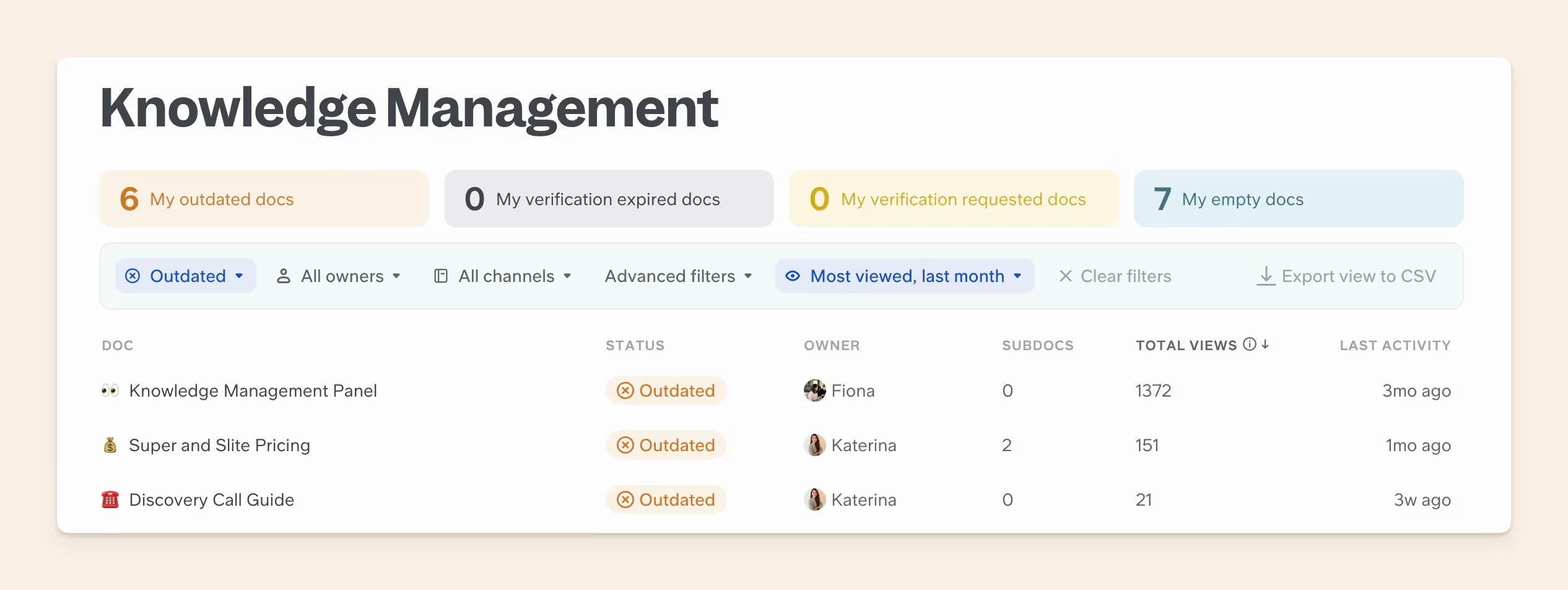
Teams can filter the panel by owner, status, channel, views, and recent activity, then take bulk actions where needed.
The panel can support the working side of your controlled-document register. Details such as the approver, effective date, retention requirement, and employee acknowledgment may still need to be recorded in the document or the system that holds the formal record.
Keep restricted documents restricted
Use channels to control access to groups of documents, then add document-level restrictions when a smaller audience is needed. Drafts can remain private during review, while the approved version is published in the channel employees should use.
The same permissions apply when people search or ask questions through Slite Agent. Slite checks access in real time, so users only retrieve information from documents they are allowed to open.
Retire obsolete documents
Use Slite's Doc Verification status to show employees which documents they can trust. A document marked Verified is considered current, and you can set a verification period so the owner is prompted to review it again when that period expires.
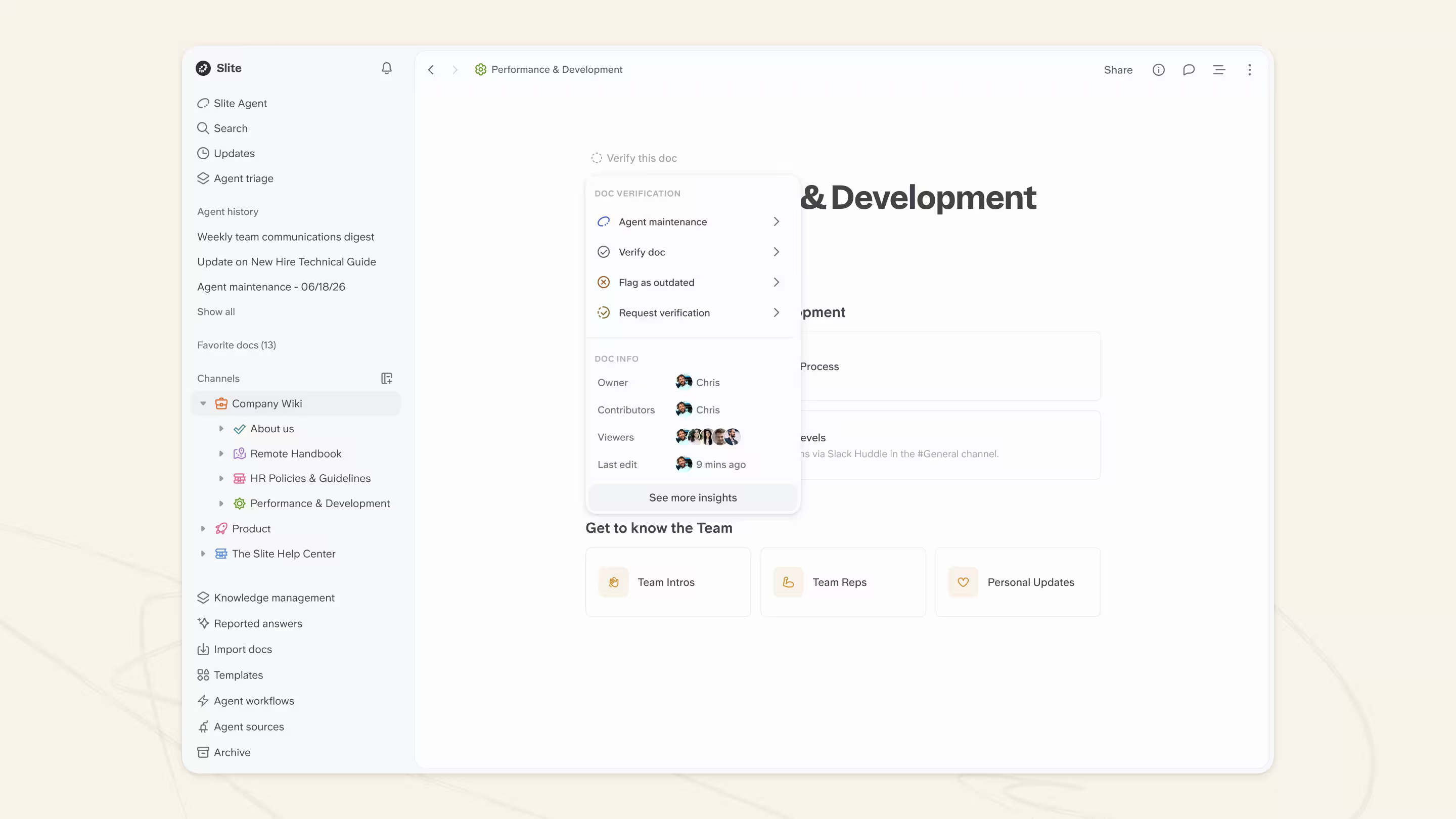
When someone notices that a document is no longer accurate, they can flag it as Outdated, add context, and notify the owner. Outdated documents are excluded from Slite Agent answers and ranked lower in Ask.
Once a document is no longer needed, archive it to remove it from active channels without deleting it. Its existing permissions remain in place, and authorized users can restore it later if needed.
Let Slite Agent flag stale documentation and draft the update
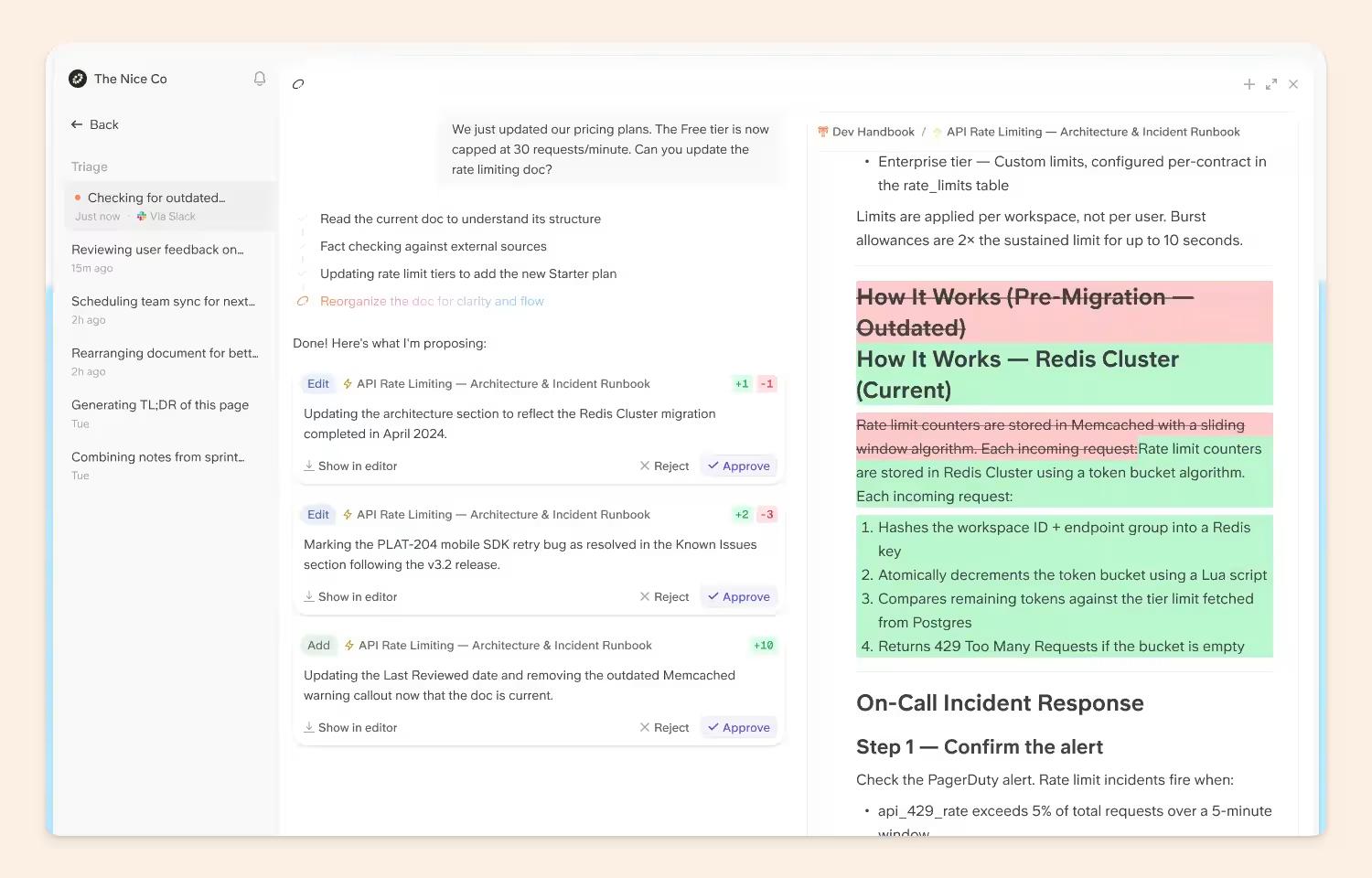
Slite Agent checks documents against changes across more than 20 connected tools, including GitHub, Jira, and Slack. When work changes before the documentation does, it flags the affected section and drafts an update in Triage.
The document owner reviews the suggestion and chooses Accept or Dismiss. Nothing changes automatically.
Before you go
A few things to keep in mind:
- Your policy should define what verification, comments, and publication mean in the approval process.
- Slite's Document History and Enterprise audit logs can support audit reviews by showing document changes and broader workspace activity. For audit documentation, teams can export documents from Slite and upload them to a compliance platform such as Vanta.
- Use Slite for the policies and procedures employees work from every day. Then keep the formal record in a dedicated QMS or compliance platform when the workflow requires enforced approval stages or validated workflows. A dedicated system is also necessary for locked versions, revision-specific links, or mandatory acknowledgment tracking.
To see how Slite fits into your document control setup, book a demo!
FAQ
What are the duties of a document controller?
The duties of a document controller are to maintain the controlled-document register, check document status and metadata, route documents for review and approval, control access and distribution, retire obsolete versions, and preserve required records.
What is the document control procedure in ISO 9001?
ISO 9001:2015 does not prescribe one standalone document control procedure. Clause 7.5 requires organizations to identify, review, approve, distribute, protect, update, retain, and dispose of documented information. Current versions should be available where people need them, while obsolete versions should be protected from unintended use.
Does a company need a dedicated document controller?
No, a company does not always need a dedicated document controller. Large or highly regulated organizations may assign the work to a specialist or department. Smaller technology companies often divide it across compliance, security, quality, operations, and individual document owners. Every responsibility still needs a clear owner.
What is engineering document control?
Engineering document control is the process used to manage technical drawings, specifications, calculations, models, and other project documents throughout their lifecycle. It is common in construction, manufacturing, and engineering projects, where teams must track revisions, approvals, distribution, and superseded files.
Software teams apply the same principle to runbooks, architecture documents, API documentation, and deployment procedures, where changes in code or infrastructure should trigger a human review of the affected documentation.