You need one answer, and instead you open your documentation tool and find four different versions of the same doc, never sure which one is current.
So you ping a colleague, dig through Slack threads, and reopen the same Google Drive folder you searched last week.
Traditional knowledge bases let you store information. AI knowledge bases work with it.
An AI knowledge base stores your company's information, policies, processes, meeting notes, and project docs, and uses AI to make all of it instantly searchable, easier to write, and simpler to keep updated.
With an AI knowledge base, you type a question in plain English and get an instant response.
This guide covers how an AI knowledge base works, what it does for your team, and how to choose the right one.
Key takeaways
- An AI knowledge base combines natural language processing, machine learning, and semantic search so your team asks questions in plain English instead of hunting through folders.
- The AI features do the heavy lifting: AI-powered semantic search, AI writing and drafting from your existing docs, routines and workflows, duplicate detection, and spotting the gaps where people search but find nothing.
- Different teams get different wins, from deflected support tickets to faster onboarding to a single search layer across your stack.
- Choosing well comes down to adoption, integrations, and a real productivity delta.
What is an AI knowledge base?
An AI knowledge base is a central store of your company's documentation that uses artificial intelligence to make everything searchable, writable, and maintainable in one place. You ask a question in plain language and get a direct answer, the system helps you draft new docs from existing ones, and it flags content that has gone stale.
Traditional knowledge bases let you store information. AI knowledge bases work with it.
| Traditional Knowledge Base | AI Knowledge Base |
|---|---|
| You search using exact keywords | You ask questions in natural language |
| You write documents from scratch | AI surfaces relevant content across all documents |
| You organize files by hand | AI auto-tags, categorizes, and links related content |
| You manually track what's outdated | AI flags stale content and suggests updates |
| You hope people find the right information | AI learns from searches and improves over time |
An AI KB is for any team that has outgrown scattered docs but growing companies gain the most from unifying knowledge across tools.
How AI knowledge bases work and what that unlocks
AI knowledge bases combine three technologies:
- natural language processing, lets the system understand questions, generate text, and suggest content,
- machine learning, helps it get smarter over time by learning from searches, writing patterns, and content updates,
- and semantic search, means it finds and recommends information based on meaning, not just matching keywords.
The system works in four steps: ingestion, processing, retrieval and generation, and learning.
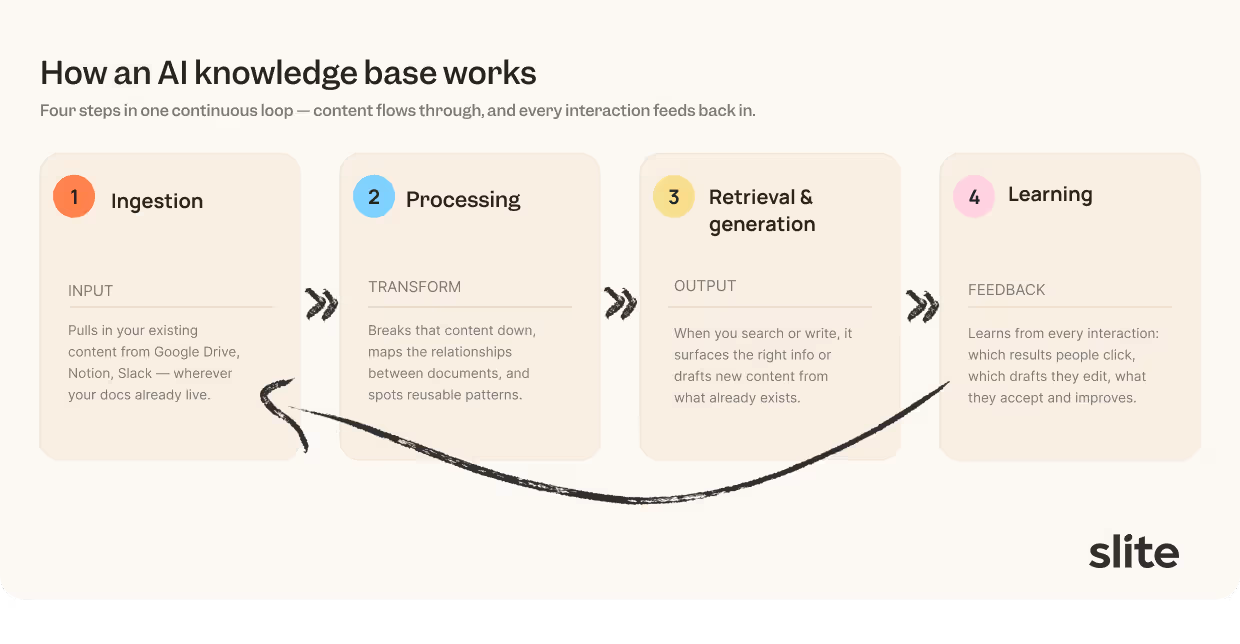
First, it pulls in your existing content from Google Drive, Notion, Slack, or wherever your docs live.
Then it processes that content by breaking it down, understanding relationships between documents, and identifying reusable patterns. When you search or write, it retrieves relevant information or generates new content based on what already exists.
Finally, it learns from every interaction, which results people clicked, which drafts they edited, which suggestions they accepted, and gets better.
Now, what do these interactions actually unlock in terms of everyday workflows?
Editor AI assistant
When a team is building the habit of pouring its knowledge into written documentation, you want as little friction as possible. It's important to remove anything that stops people from writing freely.
That writing can sometimes become messy and unstructured, which is why using an AI assistant can help with polishing your docs instantly, right inside the editor:
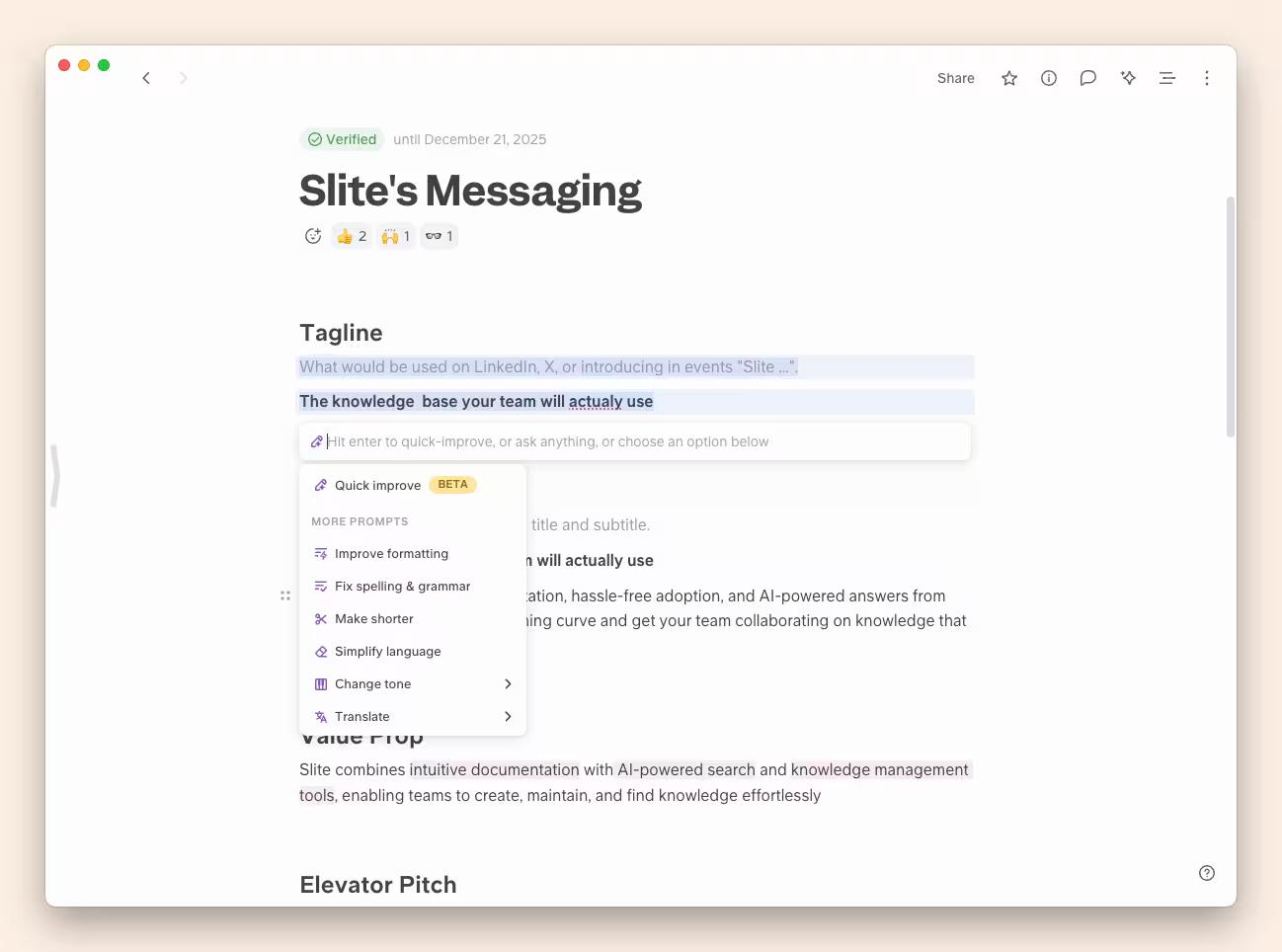
An AI knowledge base also gives you other AI editing features like shortening, rephrasing, proofreading, or auto-formatting your doc in one click.
AI-powered search and retrieval
AI search is the most-used feature of an AI knowledge base, and the one people rely on daily to pull an exact answer instead of a document to read.
Use it to answer simple questions or longer, prompt-like queries:
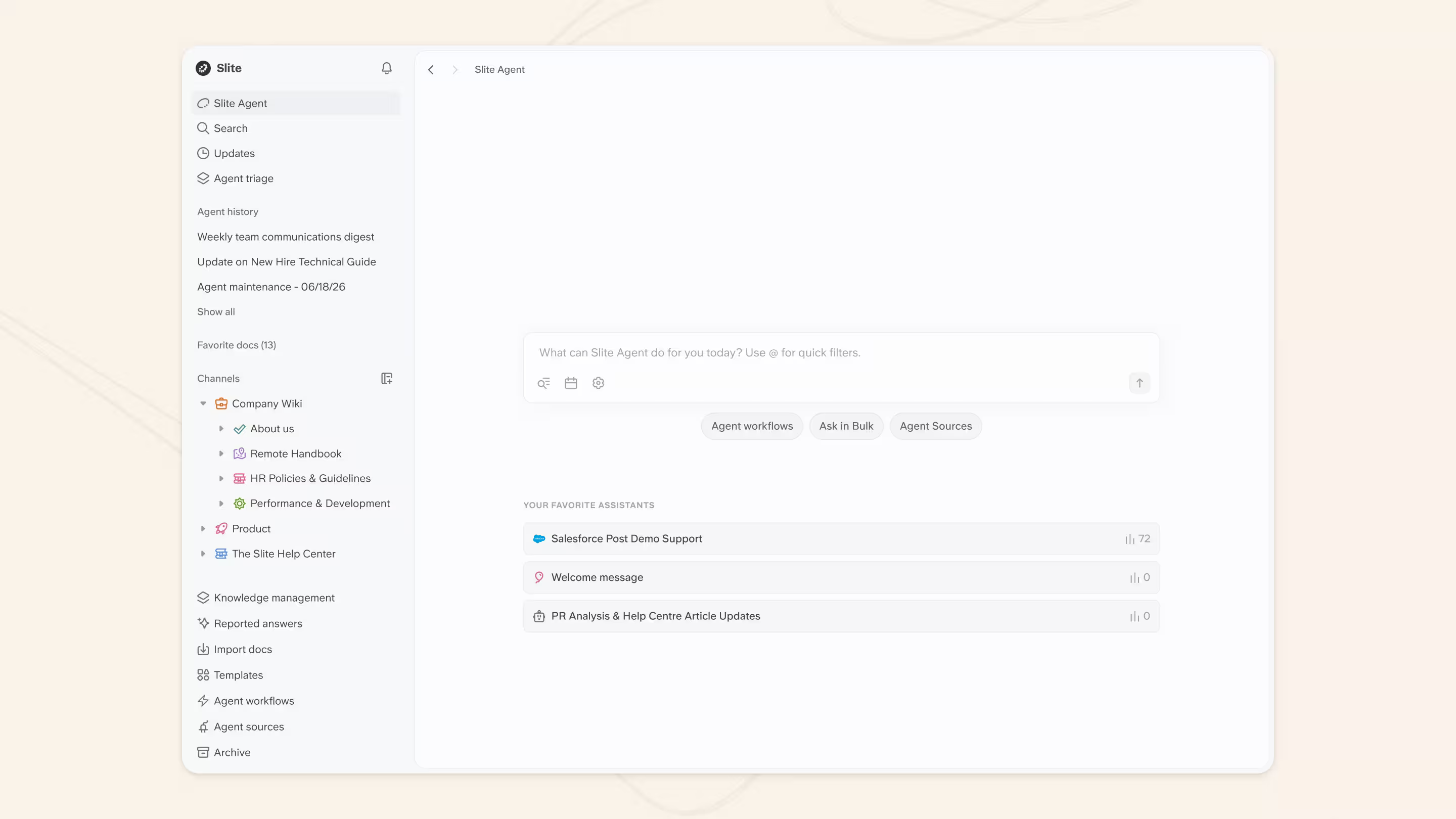
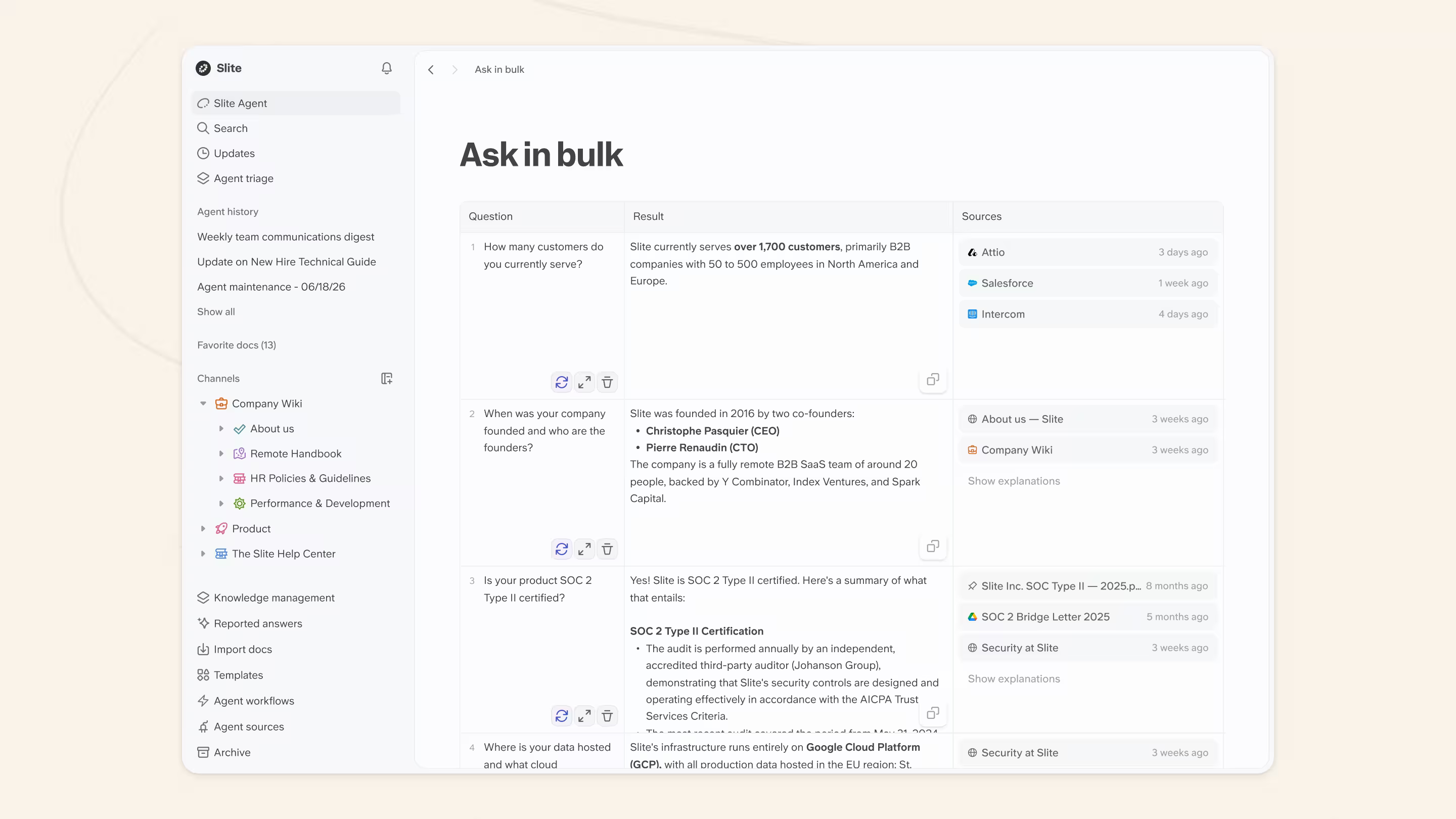
It also sources answers in bulk, such as when you're working on a large RFP:
Ask “How do I undo a deployment?” and it won't send you the whole engineering wiki. It pulls the correct steps, stitches them together, and gives you a sequence you can follow right away.
Under the hood, this is retrieval by meaning. An AI knowledge base breaks your docs into small, single-idea chunks, attaches metadata to each one, and stores them so it can find passages by meaning.
Answer quality follows directly from that groundwork: clean chunks and accurate metadata let the system pull the right passage, and a fresh, well-indexed source keeps the answer trustworthy.
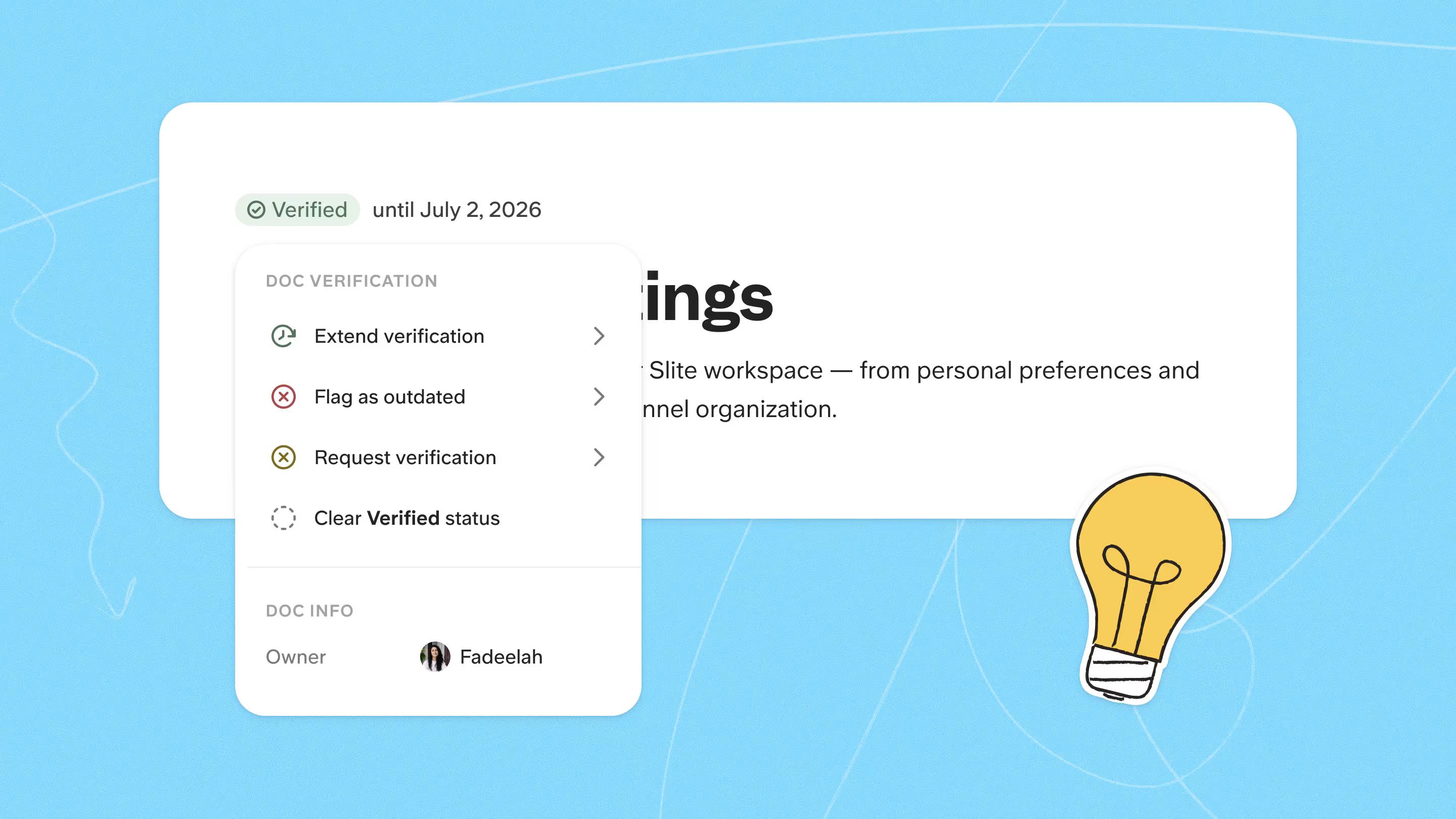
Verified docs are prioritized and content marked outdated is pushed down, so the freshest source tends to win.
How that retrieval is wired makes a measurable difference.
- Across 41 real company questions, blind-rated, a dedicated Slite agent scored 90% and answered in 39.5 seconds.
- Claude paired with Slite's MCP server scored 80% in 76.8 seconds, and Claude chaining eight separate MCP servers scored 68% in 101.9 seconds.
A retrieval layer built for the knowledge base gets there faster and more accurately than a general agent stitching tools together.
Content verification and trust signals
An AI knowledge base keeps its answers accurate by monitoring freshness in the background. It flags aging pages, highlights docs that no longer match the product, and shows you when something was last reviewed, so the most reliable version surfaces first. Outdated content destroys trust faster than anything else.
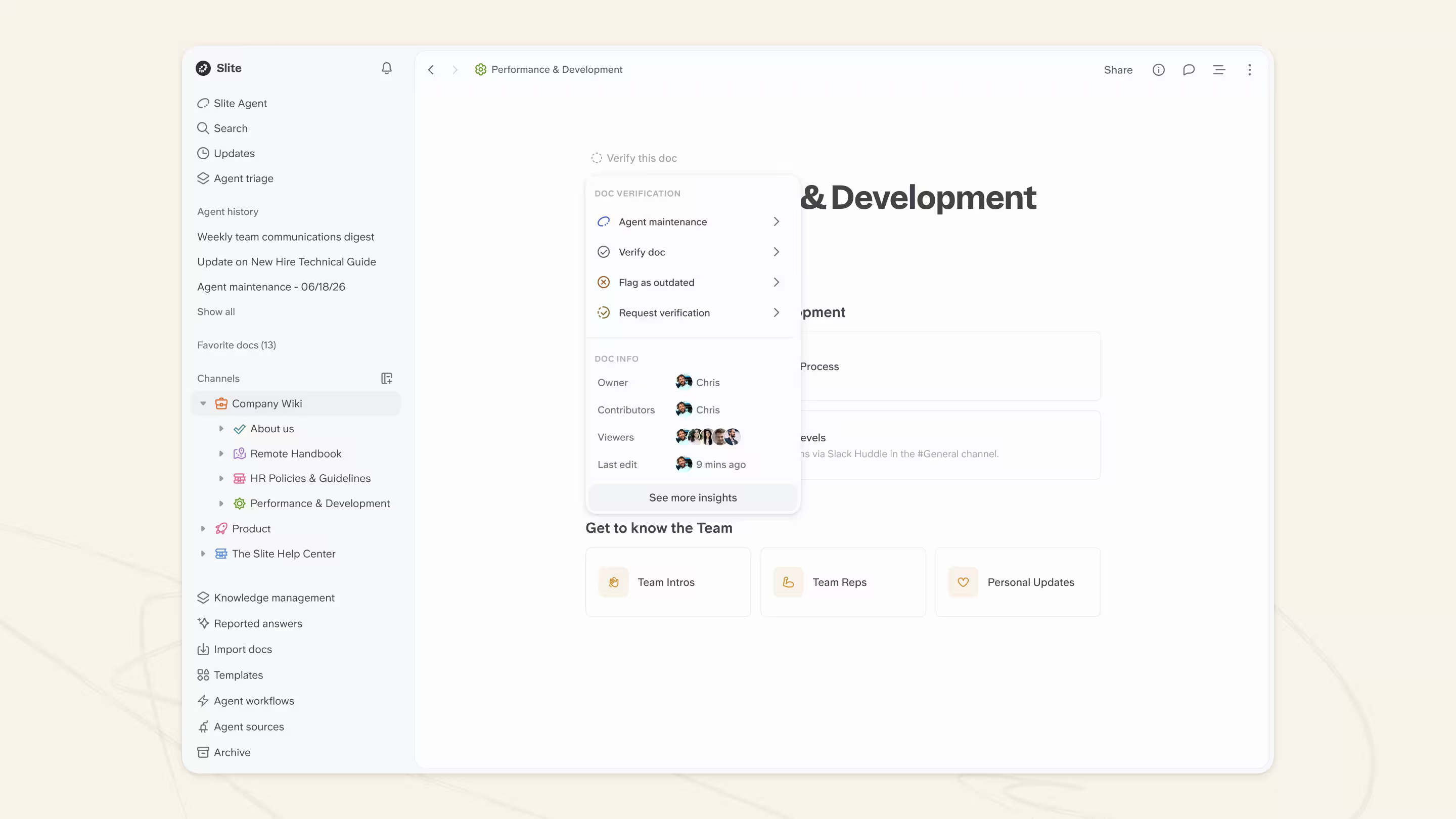
Slite's document verification system lets owners set verification windows, and the tool sends expiration reminders when something is due for review. Verified docs also appear higher in AI answers and regular search, so people see the most reliable information first.
Knowledge gap detection
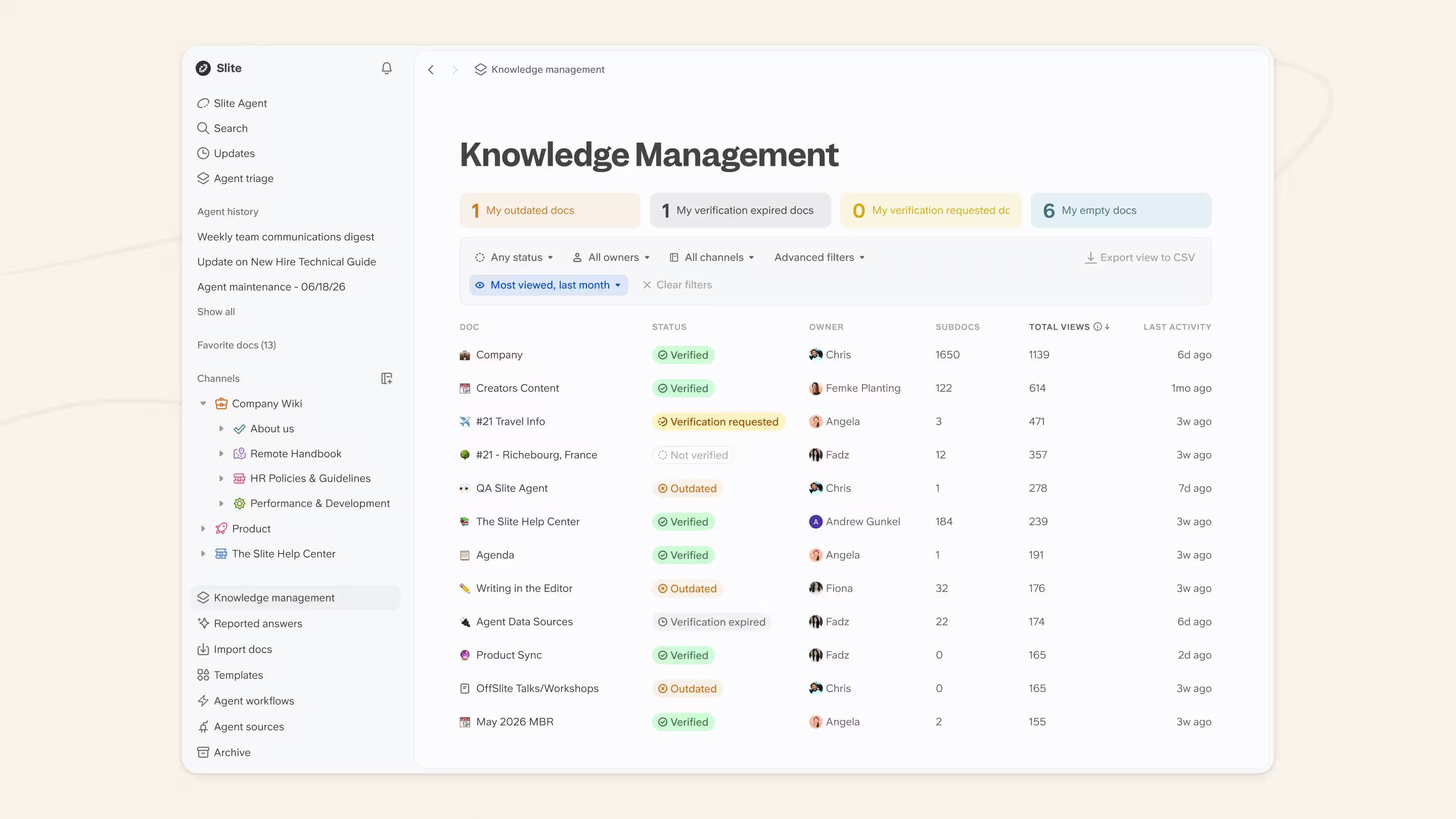
An AI knowledge base finds its own gaps by watching the questions people ask. When someone searches for something that doesn't exist or gets weak results, the system flags that gap for your team, which shifts knowledge maintenance from reactive to proactive.
It is the start of what we think of as Question-Driven Documentation: much as Test-Driven Development lets tests drive the code, the real questions people ask drive which docs get written next.
Slite operationalizes this with Ask Insights and its Knowledge Management Panel, which surface the questions people ask, including the ones with no good answer, alongside outdated pages and duplicate content. You get a real to-do list built from real demand instead of guessing what needs improving.
Multi-source connectivity
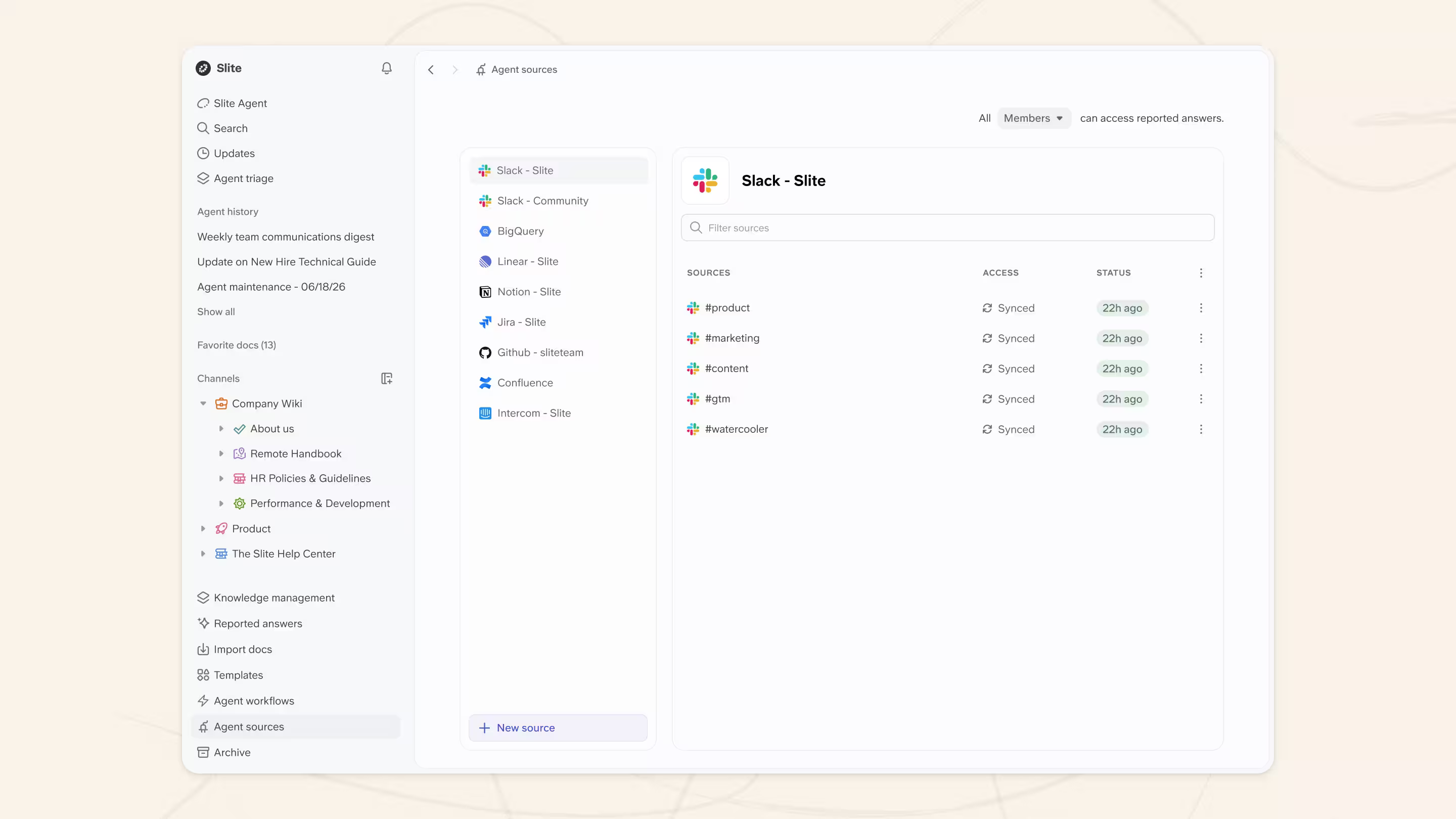
An AI knowledge base connects to your existing tools by indexing them behind one search layer, so it stays your single source of truth even when your knowledge lives across many apps. Ask “Where is the latest sales deck?” and the system pulls the answer from a Drive folder, a wiki page, or even a pinned message in a channel.
That cuts down the classic “Who has the link to this?” scramble. If you're a large team with knowledge scattered across your tech stack, Slite can connect your entire stack and find answers to your queries, no matter how niche they are.
Analytics and usage insights
You've got a great knowledge base, but how do you know if people are actually using it?
AI knowledge bases like Slite show how people actually use your information. You can see the top searches, which answers land most often, which queries fail, and where users get stuck. This helps teams improve onboarding, tighten documentation, and fix confusing workflows.
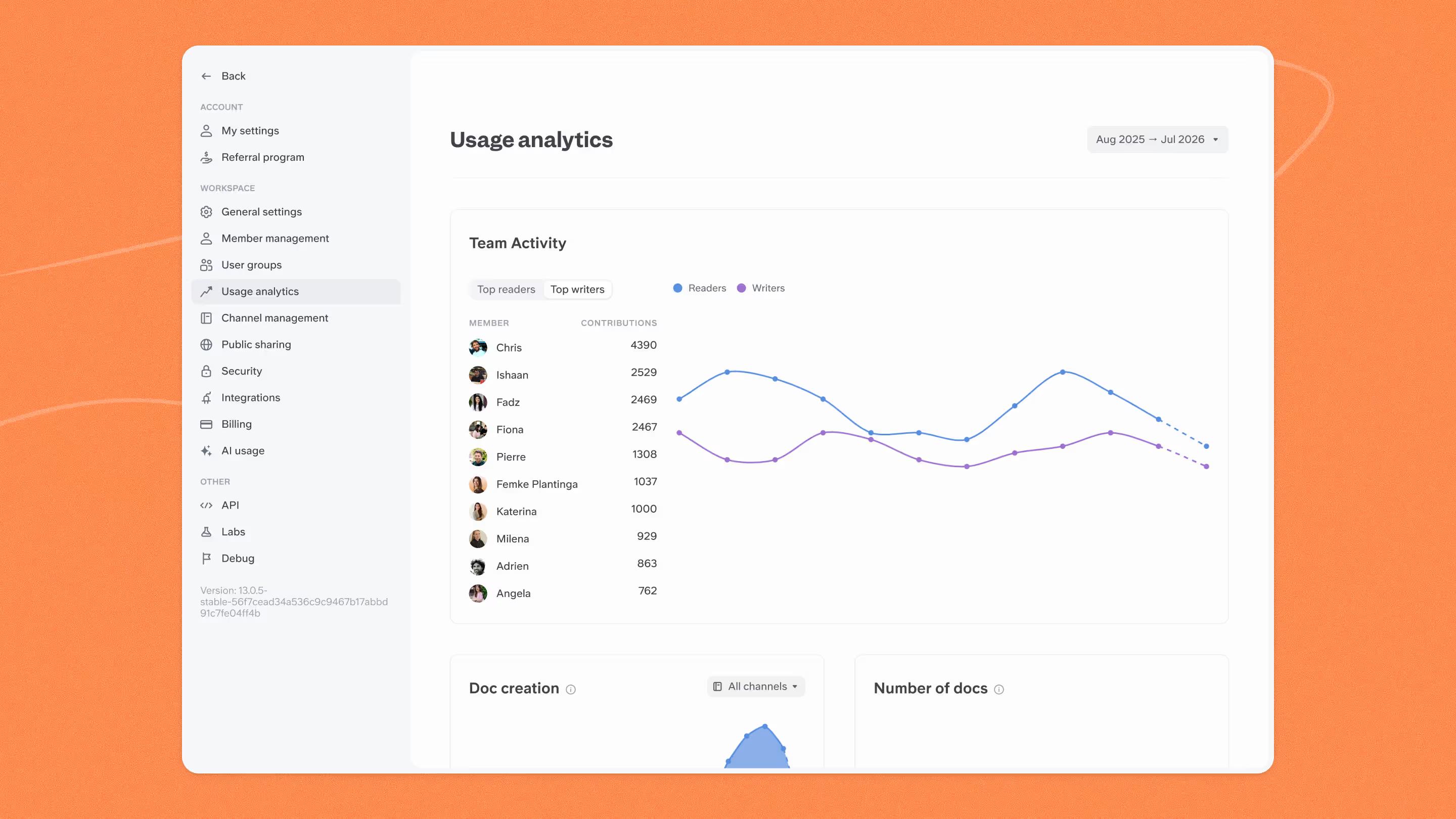
These insights turn your knowledge base into a living system that improves every week, rather than a static library that decays silently.
AI knowledge bases can keep themselves current
Beyond search and drafting, an AI knowledge base can run routines that keep it up to date on its own, flagging pages that have gone stale and surfacing the gaps where people keep searching.
That is the early shape of a self-maintaining knowledge base, which we look at in depth further down.
What AI knowledge bases can do for your team
AI knowledge bases serve different teams in different ways. Here's what they unlock depending on how you use them:
Customer-facing: Deflect support tickets
A customer-facing AI knowledge base lets users ask questions on your public help center instead of hunting through nested docs. It gives customers fast, accurate answers so they don't have to jump around 100s of docs in your product help center.
For example, a public help center built on a tool like Mintlify lets users ask a natural question and get a clear-cut answer.
What this unlocks: Fewer support tickets, faster resolution times, and happier customers who can help themselves.
Internal support: Resolve edge cases faster
Internal support knowledge bases hold internal details that customers never see, such as edge cases, troubleshooting steps, approval guidelines, and temporary workarounds. Think of it as a customer-facing knowledge base plus confidential info that support reps lean on to resolve tickets.
AI features for internal support include natural-language asking and automatically flagging outdated docs periodically.
What this unlocks: Support reps resolve tickets faster without pinging the product team. Fewer escalations, more first-touch resolutions.
Employee experience: Onboard employees faster
These organize the knowledge that employees across the company use every day. Things like onboarding steps, HR policies, team workflows, and internal processes all live here.
Companies lean on this type when they grow quickly or when repeated questions start slowing teams down. It keeps everyone aligned and reduces the “Where do I find this?” loop that eats up productive time.
For instance, a new employee will certainly need to know how to apply for PTO. With an AI knowledge base, they can just ask instead of jumping around. It's one reason a dedicated HR knowledge base shortens onboarding.
What this unlocks: New hires ramp up in days instead of weeks. Fewer repeated questions in Slack. Teams stay focused instead of answering the same thing over and over.
Cross-tool: Unify scattered knowledge
Instead of storing everything in one place, an LLM knowledge base integrates with the tools your team already uses and creates a unified search layer across them.
You can use this with Slite's Pro plan, where Slite Agent searches across all your tools to give you an answer to any work-related question.
What this unlocks: No more “Where did we put that?” moments. You ask once, and the AI searches Slack, Notion, Drive, and everything else at once.
How to choose the right AI knowledge base
Choosing an AI knowledge base is less about fancy features and more about whether it fits how your team actually works. These criteria will help you avoid shiny demos and choose something that holds up in real life:
Team-wide adoption potential
Adoption is what makes an AI knowledge base pay off: the tool only helps when people actually reach for it, so weigh ease of use as heavily as raw capability.
Check for:
- Clean, intuitive search
- Easy content creation
- Simple verification workflows
- Straightforward admin settings
Aim for something a new hire can pick up in a few minutes. Run a small pilot with a diverse group: support reps, engineers, HR, sales. If they all get it without hand-holding, you're in good shape.
Integrations and capabilities
Your knowledge already lives in ten different places. Your AI knowledge base should connect to all of it. Test whether the tool pulls accurate info from your existing systems of record and updates when those systems of record change.
Ask:
- Does it integrate with our existing stack (Slack, Drive, Notion, CRM)?
- Can it surface answers from multiple sources in one query?
- Does it respect permissions across all connected tools?
The best tools meet your knowledge where it already lives, connecting to it in place so you keep working in the tools you already have.
Productivity delta
A good AI knowledge base earns its place by saving real time: people find answers in seconds instead of minutes, Slack channels get quieter as the same questions stop repeating, new hires ramp up in days instead of weeks, and everyone trusts what they find instead of double-checking with a colleague.
The productivity delta should be obvious:
- Time saved searching: Can people find answers in seconds instead of minutes?
- Reduction in repeated questions: Do Slack channels get quieter because people self-serve?
- Faster onboarding: Do new hires ramp up in days instead of weeks?
- Confidence in information: Do people trust what they find, or do they still double-check with a human?
Run real queries your team asks every week and look for crisp, direct answers: a strong tool pulls the exact steps together and gives you something you can act on right away, sourced from your own docs. The clearest signal is time saved, the hours per week per person the team gets back.
If you want to see what that looks like in practice, Slite's knowledge base solution is built around exactly these criteria.
How to set up and manage an AI knowledge base
An AI knowledge base gives you AI power in one of two ways: it either ships with native AI features, or it exposes MCP so an outside AI can operate on your docs directly. Most teams use both.
Native AI features to look for in an internal knowledge base include:
- Custom AI assistants: Reusable AI prompts and templates tailored to specific recurring knowledge-management and writing tasks.
- Editor AI assistant: In-doc tools for writing, summarizing, asking questions about a specific document (Ask on a Doc), and styling content.
- Model Context Protocol (MCP) integration: Remote MCP servers on all plans let external tools (like Claude Code, Cursor, or ChatGPT) securely read from and draft to your KB, routed through Slite's human-approval guardrails.
- Active knowledge drift detection: Automatically monitors connected tools to flag when documentation falls out of sync with real-world activity.
- Proactive draft proposals: Automatically drafts updates, organizes sections, merges duplicates, and writes new docs based on detected changes.
How AI agents use your knowledge base
The second path is MCP. AI agents don't only answer from your knowledge base, they work inside it. Through Slite MCP, an external agent like Claude, Cursor, or ChatGPT can read your docs and draft changes back to them.
Permissions come along for the ride: an agent inherits the same access controls as the person it acts for, so it can only reach the docs that person could reach.
That is what makes an agent safe to point at a shared knowledge base: it proposes the change and a human still approves it.
AI Knowledge base implementation - an example from a Slite customer
Thomas, the COO at Premium Plus (Zendesk's top EMEA partner), took ownership when their consulting team's information became scattered and messy.
Documents and processes were spread everywhere, slowing down work and making it harder to serve clients.
He knew they needed one central knowledge hub. Here's their implementation story broken down in specific phases.
Phase 1: Setup
Someone needs to own the project of setting up a knowledge base. Typically that's an operations manager, COO, or team lead who understands what knowledge matters and can drive adoption. That person defines what success looks like: reducing repeat questions in Slack, shortening onboarding time, or speeding up support ticket resolution. Clear goals shape every decision that follows, and once the tool is live, that owner assigns specific documents and channels to the people who will keep them current.
Step #1: Survey your team to understand what problems you're actually solving.
Don't pick a tool and force it on people.
Thomas started by asking Premium Plus employees what they were missing and what frustrated them about finding information.
This survey revealed they needed a focused knowledge base, not an all-in-one tool trying to do everything.
The feedback told him exactly what features mattered:
- mobile access for remote work,
- integrations with existing tools like Slack and Asana,
- strong AI search,
- and simple document management
Starting with user needs, not vendor features, ensures you build something people will actually use.
Step #2: Test options with your team and let ease of use drive the decision.
Premium Plus gave employees trial accounts for both Notion and Slite, letting them test both hands-on.
They evaluated security, flexibility, teamwork features, and integrations. But the deciding factor came down to ease of use.
The best knowledge base in the world is worthless if people won't open it.
Premium Plus chose Slite because the simple, user-friendly design meant team members could jump in without a steep learning curve. No complex setup, no training burden, just clear navigation and intuitive document creation.
Steph #3: Create foundational content immediately to give people a reason to use it.
Thomas didn't launch an empty knowledge base and hope people would fill it.
“We created some content right away. We started with the company Handbook. This gave people a reason to use Slite from day one,” he explained.
The handbook became the anchor: company policies, processes, and essential information everyone needed regularly.
This approach meant from launch day, the knowledge base had value. People opened it because they actually needed what was inside, not because they were told to.
Step #4: Set up integrations so the knowledge base fits into existing workflows.
Premium Plus connected Slite with their existing toolstack: Slack, Google Workspace, Asana, Zendesk, and HubSpot.
These integrations meant people could search the knowledge base directly from Slack without switching apps, link Asana tasks to relevant docs, and pull in support documentation from Zendesk.
The knowledge base became part of how they already worked instead of adding another disconnected tool.
20+ connected tools gave them flexibility to connect everything without forcing the team to change habits.
Step #5: Organize content into clear spaces that match how your team thinks.
Premium Plus structured their knowledge base around natural divisions:
- company-wide announcements,
- team-specific spaces for project updates,
- new hire onboarding materials,
- and an employee directory.
This wasn't arbitrary. It mirrored how people actually looked for information.
If you're onboarding, you go to the onboarding space. If you need a team update, you check that team's area.
Simple navigation meant less hunting and more finding. The AI-powered search handled everything else, surfacing relevant docs even when people didn't know exactly where to look.
Phase 2: Management
Step #1: Assign channel admins to keep content current and prevent documentation rot.
Premium Plus assigned one channel admin for each content area. “They make sure the content stays up-to-date,” Thomas shared.
This prevents the common problem where knowledge bases become graveyards of outdated information.
When documentation is unreliable, people stop trusting it and stop using it. Channel admins review their areas regularly, update policies when things change, and remove obsolete content.
Clear ownership means accountability: someone is responsible for making sure the shipping policy reflects current procedures, not last year's process.
Step #2: Build self-service into your culture so people check the knowledge base first.
For Premium Plus, the biggest return on investment came from self-service.
“People can help themselves, letting colleagues focus without interruptions for common questions,” Thomas explained.
This required cultural change, not just a tool. When someone asks a question that's documented, respond with the knowledge base link instead of typing the answer.
Add “check the knowledge base first” to team norms. Celebrate when people find answers themselves. The more people use it, the smarter the AI gets at surfacing relevant content.
Step #3: Use the knowledge base for ongoing communication, not just static documentation.
Premium Plus uses their knowledge base for company meetings like Town Hall sessions and lunch-and-learn presentations. “Everything is documented in Slite too,” Thomas said.
This makes the knowledge base a living workspace, not an archive. Meeting notes, project updates, and company announcements all live there, giving people constant reasons to return.
When the knowledge base becomes where real work happens, not just where old policies are stored, adoption stays high and information stays current.
Step #4: Track usage patterns to identify gaps and improve content.
Monitor what people search for and where the AI falls short. Most AI knowledge bases show failed searches, questions that returned no useful results.
Review these regularly to spot documentation gaps. Analytics also reveal which documents get viewed most, which sections people actually read versus skim, and which content goes unused.
If multiple people search for something that doesn't exist, create it. If a document gets zero views in six months, either promote it better or remove it. Let actual usage guide what you maintain and what you build next.
Step #5: Plan for transparency and expansion as the knowledge base matures.
As teams get comfortable with their AI knowledge base, they often expand what they share, opening up processes, making culture docs public, documenting things that were previously tribal knowledge.
This transparency builds trust and makes institutional knowledge accessible to everyone. Plan review cycles where you revisit what should be documented next and what can move from private to shared.
Step #6: Use AI features to cut manual maintenance work.
Premium Plus benefits from Slite's AI-powered search, which gets better as people use it.
The AI learns which results people click, which documents relate to each other, and how to surface relevant content even when searches use different terminology. This means less manual tagging and categorization.
The system also suggests related documents, helping people discover content they didn't know existed. As your knowledge base grows, AI handles the complexity of connections and relevance that would be impossible to maintain manually.
Step #7: Measure what matters and tie it back to your original goals.
Go back to the deliverables you defined at the start. If your goal was reducing repeat questions, track how often people ask in Slack versus searching the knowledge base. If it was faster onboarding, measure time-to-productivity for new hires before and after implementation.
Premium Plus saw immediate improvements: team members found information faster, self-service reduced interruptions, and important updates reached everyone reliably.
But those wins only matter because they mapped to Thomas's original goals. Keep measuring against what you said success would look like.
Common mistakes with an AI knowledge base
A handful of mistakes show up again and again, and most of them have nothing to do with which tool you pick:
- Treating it as a data dump: pouring every file in without structure buries the good answers under the noise.
- Skipping chunking and metadata: without single-idea chunks and clear tags, retrieval stays vague and the AI guesses.
- Leaving docs without an owner: unowned pages drift out of date and nobody notices until an answer is wrong.
- Never archiving superseded docs: old versions keep surfacing and competing with the current one.
- Skipping the pilot: rolling out to everyone before a small group has validated the setup kills adoption early.
- The “verify forever” trap: if verification never expires, people set docs to verify-forever just to silence the reminders, and the knowledge base quietly rots behind a green checkmark. Re-verify most docs every six months, tighten that for high-churn areas, and put policies and onboarding on a fixed cycle.
For a deeper look at what goes wrong, see why knowledge bases fail.
Where AI knowledge bases are heading
At one B2B software company, an engineer told us they asked their internal AI agent a routine question and it answered from an old, unarchived doc. The process had already changed, but because nobody archived the outdated version, the agent kept surfacing it and creating confusion.
Once agents read your docs literally, a stale page becomes an infrastructure risk.
This shift defines where AI knowledge bases are going next.
Self-maintaining knowledge bases
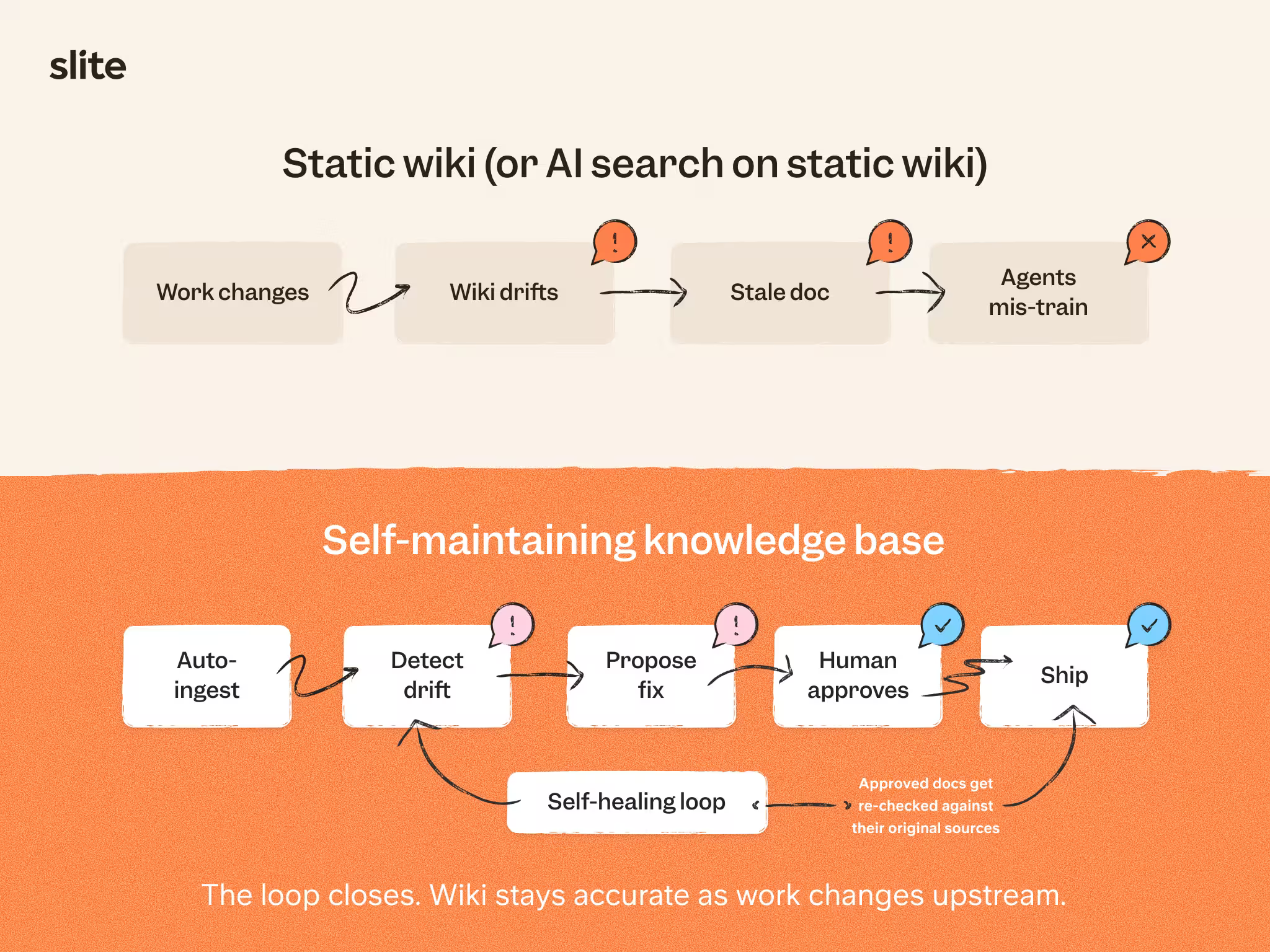
A self-maintaining knowledge base keeps itself current: it detects when a page has drifted out of date, drafts the fix, and routes it to a person for approval. These systems mature in stages that build on one another: first learning better retrieval from how people actually search and read, then flagging outdated and duplicate content, and finally drafting the fix for a human to approve.
Agentic KMS
The next step is agentic knowledge management: independent knowledge agents that live inside the KB, run routines, and take actions when a trigger fires, all under human approval.
We see it in our own work already.
We use Slite Agent heavily, asking questions and running knowledge workflows through the API, and many everyday documentation chores are disappearing. We used to write meeting notes by hand in Slite; now TL;DV or Granola capture them for us.
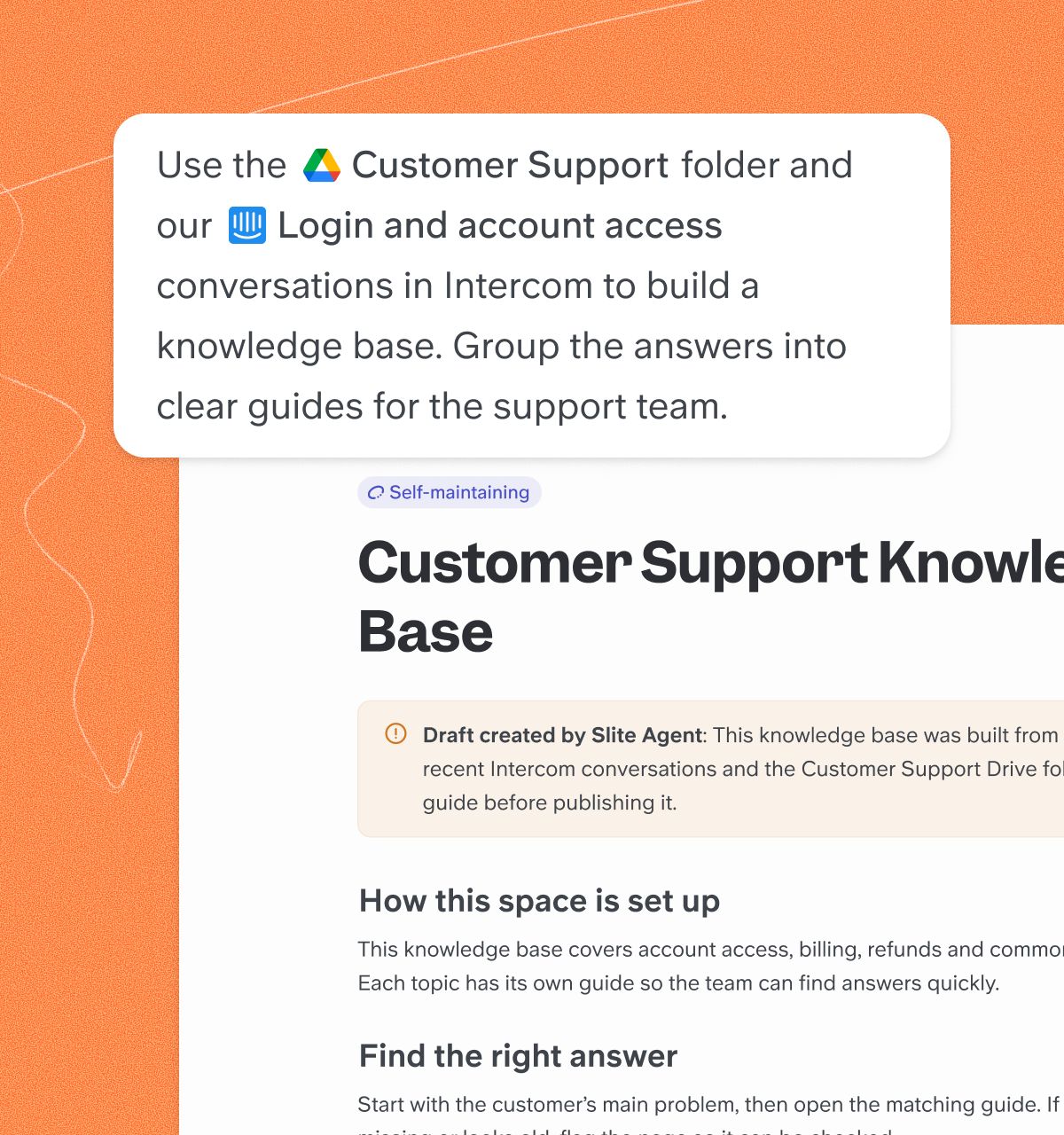
A lot of tribal knowledge is becoming agentically retrievable.
Today the AI can jot your meeting notes. Tomorrow it can take those notes, link them to your current sprint's board, and make the changes in the real PRD within Slite.
If you're buying an AI knowledge base today, the question worth asking is how much of your current documentation work it will eliminate in the coming months.
Conclusion
A great AI knowledge base cuts through noise and gives teams something they rarely get: clarity they can trust.
Slite goes a step further. It pairs Slite's curated, verified documentation with Slite Agent's cross-tool search, so you get a dependable single source of truth and instant access to information scattered across multiple tools.
If your team is tired of hunting for the current version of anything, that is the problem this solves. You can see the plans and get started whenever you're ready.
FAQs
What is the difference between a knowledge base and enterprise search?
A knowledge base like Slite gives you a curated, organized space to write, verify, and maintain documentation. Slite Agent connects to your existing tools and lets you search across them without moving any content.
How much does AI knowledge base software typically cost?
Pricing varies based on features and team size. Many tools offer free tiers for small teams, while paid plans typically follow a per-user monthly pricing model for larger organizations.
How do I migrate from a traditional knowledge base to an AI-powered one?
Most AI knowledge base tools offer import features for common formats. Migration is usually staged: start with your most critical or frequently used documentation, then move the rest once the core is in place. If you have specific doubts, feel free to get in touch with us!
How do I measure the success of an AI knowledge base?
Useful metrics include search success rate, time saved searching, reduction in repeated questions, and overall user adoption. These indicators show whether the system is actually helping people find and trust information.
What happens when an AI knowledge base returns an incorrect answer?
Good AI knowledge bases include source citations so users can verify information. They also provide verification workflows that allow teams to flag, review, and correct inaccurate or outdated content.
How do AI knowledge bases protect sensitive company information?
Sensitive data stays protected through permission controls and role-based access. Enterprise-grade tools add knowledge base security and compliance features so only authorized users can reach restricted documentation.
How does an AI knowledge base keep its answers accurate and approved?
It keeps answers accurate through verification and human approval. Owners set verification windows, the system flags docs that have drifted out of date, and verified pages rank higher in both search and AI answers. When the agent drafts an update, a person approves it before it goes live, so answers stay current and trustworthy.
How does an AI knowledge base connect to your existing tools?
It connects through integrations and the Model Context Protocol. Slite indexes content from tools like Slack, Google Drive, and Notion, and its MCP servers let external agents read and draft across them under your existing permissions. You ask once and get an answer sourced from wherever the knowledge actually lives.
How do you keep an AI knowledge base current as things change?
You keep it current with drift detection and clear ownership. Slite Agent monitors connected tools and flags when a doc no longer matches reality, then proposes a fix for a human to approve. Assign each doc an owner, set a re-verification cycle, and let the system surface what needs attention.